
TLDR
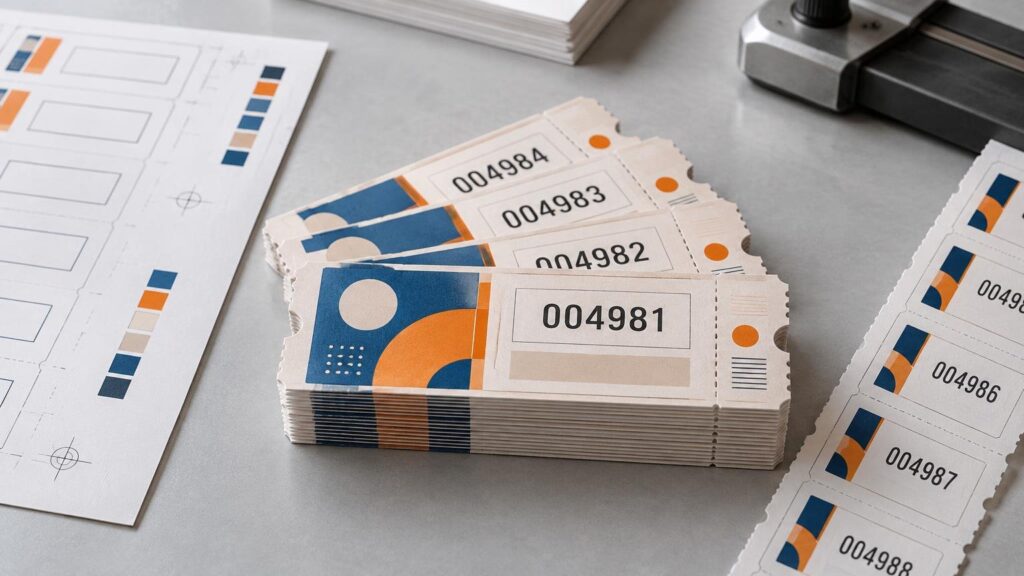
Sequential numbering printing assigns a changing identifier to each printed piece. It works well for tickets, multipart forms, vouchers, inspection labels, asset tags, certificates, and controlled documents. The critical production decision is not merely how the number looks; it is how the sequence will be generated, imposed, finished, checked, and reconciled. Specify the start and end values, increment, leading zeros, prefixes or suffixes, repeat rules, finished packing order, and treatment of damaged pieces before production begins.
Numbering can support traceability, but a printed number alone does not create a traceability system. Someone must record what the identifier represents, where the item went, and what events are associated with it. If machines need to capture the identifier, pair the human-readable number with a suitable barcode and validate that both encode the same value.
What sequential numbering means in print
In its simplest form, sequential numbering changes one field from piece to piece: 0001, 0002, 0003, and so on. A numbering rule may also define a prefix, suffix, starting value, ending value, increment, ascending or descending direction, and the number of pieces printed before the value advances. Leading zeros preserve a fixed visual format such as 0001 instead of 1.
The identifier does not have to be purely numeric. A project might use TKT-000125, WH2-04891, or 2026-A-0075, provided the structure is defined clearly and the production system can generate or import it reliably. Prefixes can communicate a series, location, document type, or production period, while the changing portion distinguishes individual pieces.
Consecutive numbering is only one type of variable-data printing. Names, addresses, dates, product references, quantities, images, and barcodes can also change by record. For an overview of why digitally driven pages can vary without conventional plate changes, see how digital printing works.
Where numbered printing is useful
| Application | Typical identifier job | Production concern |
|---|---|---|
| Tickets and vouchers | Distinguish each admission, claim, or redemption piece | Keep stubs and body numbers matched; define packing order |
| Business and multipart forms | Give each document set a reference number | Repeat the same value across every part in the set |
| Product or equipment labels | Identify an item, unit, location, or service record | Choose a durable construction and a scannable code when required |
| Inspection and calibration labels | Connect an item with a dated record | Leave room for status fields without crowding the identifier |
| Certificates and controlled documents | Provide an individual document reference | Control duplicates, spoilage, and replacement rules |
| Batch and lot labels | Identify a production group | Do not confuse group identification with item-level serialization |
| Direct-mail pieces | Connect an outer piece, insert, response device, or record | Coordinate numbering with addressing, imposition, insertion, and postal layout |
The useful identifier is the one that matches the operational question. A ticket operator may need to know whether a number was admitted. A maintenance team may need to retrieve the history of a specific machine. A manufacturer may need to distinguish an individual unit from the batch in which it was produced. Those are different data models even if the printed fields look similar.
A range is not the same as a record list
A simple uninterrupted run can often be generated from a rule: start at 000001, stop at 005000, and increment by one. That approach is efficient because the software creates each value rather than requiring the customer to supply thousands of rows.
Use a complete data file when the values are nonconsecutive, already assigned elsewhere, tied to other fields, or subject to exclusions. Examples include preissued account references, randomly generated redemption codes, serial numbers paired with product models, and identifiers associated with individual mailing addresses. A range generator cannot infer those relationships.
In a record-based workflow, each row represents a piece or logical record, while columns hold fields such as serial_number, customer_name, product_code, or barcode_value. Adobe describes data merge as combining a target document with a data source; supported text sources include CSV and delimited text files whose first row supplies the field names. Adobe’s InDesign data-merge documentation explains this basic relationship between the layout and source records.
Keep one authoritative identifier column. If the number appears in two locations—such as on a ticket and its detachable stub—place the same variable field in both positions rather than maintaining two independently edited columns. Reusing a field placeholder causes the value from that record to appear in each assigned location.
Specify the sequence before designing the artwork
A useful numbering specification answers all of the following questions:
- What are the exact first and last values?
- Does the sequence ascend or descend?
- Does it advance by one or another increment?
- How many printed pieces should carry each value before it advances?
- How many digits are required, and must leading zeros be retained?
- Are there fixed prefixes, suffixes, separators, or check characters?
- Does the same number appear more than once on each finished piece?
- Must the finished items be packed in ascending or descending order?
- Are any values reserved, excluded, or already issued?
- What happens to a number when its printed piece is damaged or rejected?
Do not leave these choices implicit. “Number 1 through 5,000” does not say whether the expected format is 1, 0001, or 000001. It also does not explain whether cartons should begin with the lowest number, whether sets repeat a number across multiple sheets, or whether replacement pieces may reuse spoiled identifiers.
Design the variable field for the longest value
Variable fields need enough room for their widest possible content. A sample showing 0001 proves little if the actual run ends at TICKET-100000. Test the longest prefix, suffix, and numeric value in the chosen font at the final size. Allow for normal registration and cutting tolerances rather than positioning the field against a trim, perforation, fold, or die-cut edge.
Use a typeface that makes similar characters distinguishable when people will read or transcribe the code. The difference between 0 and O, 1 and I, or 5 and S becomes an operational issue when staff enter identifiers manually. Adequate contrast and uncluttered space also matter more than decorative styling.
For tickets or forms with detachable sections, verify every repeated placement. The number on the retained stub must match the number on the customer portion. The same principle applies to multi-part forms: the identifier should remain associated with every intended part after separation.
Plan imposition and finishing as part of the sequence
A numbered file may be logically correct and still emerge in the wrong physical order. Multiple pieces are commonly arranged on a larger sheet. After printing, the sheet may be cut, collated, perforated, folded, padded, or bound. Each operation changes how the records become finished stacks.
This is why the printer needs the required delivery order before imposing the job. A layout filled in rows first can produce a different stack sequence from one filled in columns first. InDesign supports multiple-record placement using either rows-first or columns-first ordering, but that setting must agree with the cutting and stacking plan.
Consider a sheet containing eight tickets. Printing values 0001 through 0008 across each sheet looks intuitive on screen. After the piles are cut apart, however, each cut position may contain every eighth number rather than a continuous stack. A production imposition can instead distribute records so the cut stacks combine into the intended order. The correct arrangement depends on the number-up layout, sheet count, cutting method, and packing plan.
Ask for a finishing diagram or sequence sample when delivery order matters. On a more general card or invitation project, proofing and production planning for custom cards illustrates why approval should cover the manufactured piece rather than artwork in isolation.
Proof the rule, not thousands of nearly identical pages
A useful proof demonstrates both the static design and the variable behavior. Review records from the beginning, middle, and end of the run. Include transition points such as 0099 to 0100 or 0999 to 1000, where field width or leading-zero errors become visible.
The proof should confirm:
- the first and last expected values;
- the prefix, suffix, separators, and leading-zero format;
- the number of times each identifier appears on a piece or set;
- the relationship between human-readable text and any barcode;
- font size, contrast, alignment, and clearance from finishing features;
- the absence of blank, duplicate, or unexpectedly repeated records;
- the imposed order and expected order of finished stacks.
Data-merge preview tools help expose layout problems before output. InDesign can preview merged records and produce an overset-text report, which is useful when variable content exceeds its assigned frame. Previewing remains only one control: the source data, merge settings, exported file, printed sheets, and finished quantity still need checks appropriate to the job.
Serialization, batches, and traceability are different concepts
Serialization identifies individual items. Batch or lot coding identifies a group. GS1 explicitly distinguishes the two: a batch or lot number by itself is not the unique identification of an individual trade item. A company can use both fields, such as LOT-2408 for the production group and 000184 for one item within or associated with that group.
GS1 also notes that serial numbers may be sequential or random. When a serial number is combined with a Global Trade Item Number, the combination can uniquely identify an individual trade item, provided duplicate serials are avoided within the relevant GTIN context. GS1’s explanation of serialization and unique identification gives the standards context.
Within GS1 application identifiers, AI (21) designates a serial-number field. GS1 barcode systems can also carry batch or lot and other attributes. The current GS1 General Specifications should govern an implementation intended to use GS1 identifiers or symbols. Do not add “(21)” to artwork merely because a label contains a serial number; use it only as part of a correctly structured GS1 data and barcode implementation.
Traceability starts when the printed identifier connects to a maintained record. That record might hold production date, inspection status, destination, service history, redemption status, or another event. Without that connection, the number distinguishes a piece but says little about its history.
When to add a barcode
Human-readable numbering is appropriate when people inspect, sort, or enter a modest number of identifiers. A barcode becomes useful when the workflow calls for faster machine capture or reduced manual transcription. The barcode symbology, size, data structure, quiet area, print contrast, and scanning environment must suit the application.
The text and barcode should derive from the same authoritative field whenever possible. Creating them independently introduces an avoidable risk: the visible number may say 004281 while the symbol encodes a different value. Production checks should scan samples and compare the decoded result with the printed text and source record.
Printing a barcode also does not make a code valid for a specific retail, logistics, postal, or regulated workflow. Those systems may prescribe identifier structures, approved symbol types, placement, and data responsibilities. Start with the governing standard or recipient’s specification, then design the label around it.
Numbered mail pieces need a coordinated layout
A mail piece may contain a serial number, account reference, response code, and variable address at the same time. Treat those as coordinated fields, not independent decorations. The number may need to match an insert or response device, while the address must remain in the required area and survive folding, inserting, and window-envelope movement.
USPS requires the delivery address to be visible and legible on the postage side and recommends clear, high-contrast addressing. Its standards also reserve areas for postal processing and place conditions on sender-generated barcodes. Consult the USPS Domestic Mail Manual for the mailing format and class in use.
Define whether the number tracks the recipient record, the physical outer piece, an enclosed item, or a response action. If inserts can shift between envelopes, matching marks or camera-based insertion controls may be needed; a correctly printed outer identifier cannot by itself prove that the intended contents were enclosed.
Production control: account for every identifier
Numbered work requires a spoilage policy. A damaged static flyer can simply be replaced with another identical copy. A damaged serialized label raises a different question: should that identifier be destroyed and recorded as void, or should an exact replacement be produced? Either method can work when it is defined in advance and reflected in the final reconciliation.
A practical control record can include the requested range, actual printed range, known excluded values, spoiled identifiers, reprints, accepted quantity, and packing sequence. For sensitive or operationally important jobs, record the identifiers assigned to each carton, pad, roll, or bundle. This makes a missing section easier to isolate than reopening the entire run.
Counts deserve special attention when values repeat. If each number appears on a three-part set, 1,000 unique identifiers may correspond to 3,000 printed numbered parts. If two labels share each identifier, the printed label count is twice the unique-record count. State both quantities so purchasing, production, and receiving teams are counting the same thing.
A complete ordering specification
Send the printer a concise specification rather than relying on notes embedded in artwork. A strong handoff includes:
- finished size, quantity, stock, and finish;
- numbering method: generated range or supplied data file;
- exact start, stop, increment, and direction;
- required digit count, leading zeros, prefix, and suffix;
- repeat count and every location where the value appears;
- barcode type and governing specification, if applicable;
- number-up layout expectations when already established;
- perforation, scoring, folding, binding, padding, or die-cut details;
- required ascending or descending delivery order;
- bundle, roll, pad, or carton sequence requirements;
- rules for spoiled numbers and reprints;
- proof records that must be shown before approval.
References
- Sequential Numbers / Letters | Avery
- MT27845.book
- Data merge overview in InDesign
- Merge data in InDesign
- Merge records in InDesign
- GSMP:
General Specifications Change Notification - How does serialisation differ from unique identification? : GS1 GO Customer Service Portal
- Standard
- DMM Mailing Standards of the United States Postal Service, Domestic Mail Manual
- faq.usps.com