
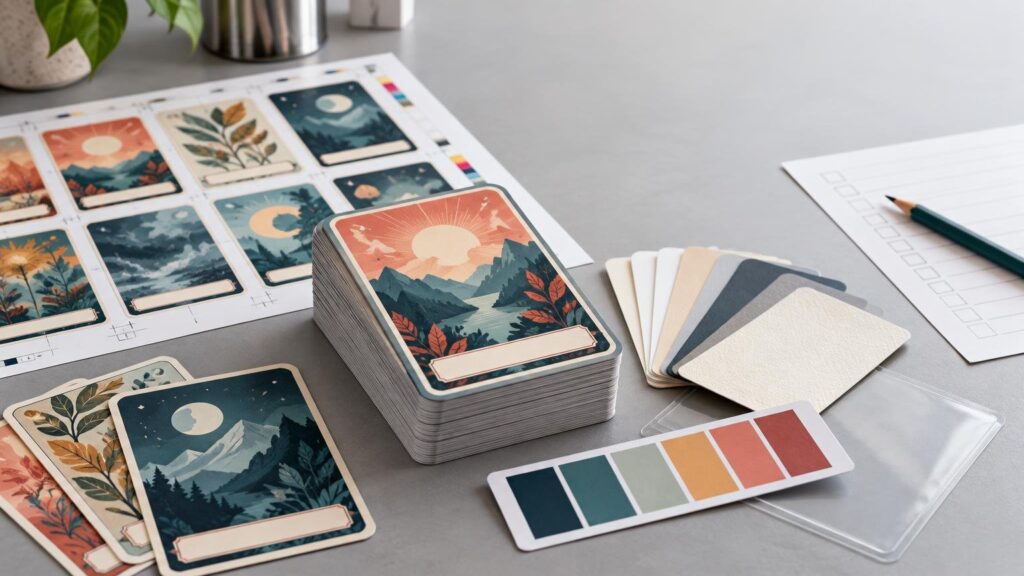
TLDR: Successful bulk custom trading card printing starts with a production plan, not merely a card design. Define the total quantity, number of unique fronts and backs, required distribution or set order, deadline, destination, and artwork ownership before requesting a quote. Build files from the current printer template, extend backgrounds through the bleed, keep essential content safely inside the trim, and inspect a proof for both visual errors and front-to-back pairing. Confirm current stock, finish, packaging, production, and shipping details for the specific configuration rather than assuming every card product uses the same specifications.
Bulk custom trading card printing can serve sports teams, conventions, promotional campaigns, artists, creators, schools, and collectible releases. “Bulk” does not have a universal card-count threshold, however. The useful definition is a run large or complex enough that quantity breaks, design versions, proofing, packaging, and delivery planning can materially affect the job.
The best printing option is therefore the one that fits the project’s actual distribution model. An event handout with one design is a different production problem from a 100-card collectible set, even if both orders contain the same total number of cards.
Choose the right type of custom card project
Start by deciding whether the cards are individual collectibles, a complete set, or a functional deck. Trading cards are generally distributed, collected, exchanged, or packaged into sets. Playing cards must work together as a deck, which makes consistent backs, deck composition, handling, and packaging especially important.
| Project type | Production priority | Questions to resolve |
|---|---|---|
| Team or player cards | Accurate names, photos, statistics, and consistent visual structure | How many copies of each player are needed? Does every card share one back? |
| Event or campaign handouts | Fast recognition and a clear message or call to action | Will cards be handed out individually, inserted into kits, or shipped to multiple locations? |
| Collectible set | Reliable front-to-back pairing and complete-set handling | Must cards arrive collated in a particular sequence or merely grouped by design? |
| Creator merchandise | Artwork reproduction, edition structure, and presentation | Are there alternate designs, rarity tiers, numbered cards, or separate packages? |
| Functional playing-card deck | Complete deck composition, consistent backs, and usable packaging | Does the selected product explicitly support the required deck format and card count? |
Printiverse presents its custom trading card printing workflow for team, player, event, collector, and promotional uses. It supports custom fronts and backs and an upload-or-template starting point. Its guidance also indicates that projects may contain multiple card designs. That establishes support for multi-design projects, but it does not by itself promise automated variable-data generation, individualized numbering, sorted-set assembly, or a particular collation method.
If sequence matters, describe it explicitly. “Ten designs, 100 copies each” is a duplication request. “One hundred unique cards assembled into ten identical sets in numerical order” adds version control and collation requirements. Ask whether the selected service supports that workflow before treating it as included.
Build a run plan before asking for a price
A printer can quote and schedule a large card job more reliably when the scope is concrete. Prepare the following information before ordering:
- Total number of finished cards required, plus any planned extras for replacements, samples, or late additions.
- Number of unique fronts and number of unique backs.
- Quantity required for each design; do not assume every version has the same count.
- Whether designs need specific front-to-back pairing.
- Whether cards may be grouped by version or must be collated into complete, ordered sets.
- Intended card size and orientation, checked against the current product template.
- Requested stock, coating, lamination, finish, corner treatment, or other options currently offered.
- Packaging expectations, such as loose cards, grouped versions, complete sets, or individual packs.
- One delivery address or multiple destinations.
- The firm in-hand date, not just the date the event begins.
- Who owns or has permission to use every photograph, logo, illustration, font, and other submitted asset.
For size planning, 2.5 × 3.5 inches and 63 × 88 mm are both discussed as near-standard trading-card formats, but they are different specifications rather than interchangeable file sizes. Confirm the exact dimensions on the live product configuration before laying out a complete set. The trading card size and specification guide provides additional context, but the template for the selected product should govern the production file.
Prepare print-ready artwork for a large card run
Cards expose alignment errors because their edges sit close to borders, names, icons, and statistics. A slight shift becomes obvious when a frame is thicker on one side than the other. Good files account for three separate zones: bleed, trim, and safe area.
Bleed
Bleed is artwork that extends beyond the intended cut edge. Its purpose is to prevent an unintended white sliver when cutting varies slightly. Background colors, photographs, textures, and borderless illustrations should continue through the bleed rather than stopping at the trim line. Adobe’s print-ready PDF guidance describes bleed as content extending beyond the trim or crop area and explains how to preserve document bleed settings during PDF export.
Trim and safe area
Trim is the intended finished edge. The safe area is an inset working zone for names, statistics, logos, QR codes, legal text, and other elements that should not risk being clipped or appearing crowded. Use the safe-area measurement supplied by the current product template; do not infer it from an unrelated business-card or playing-card template.
Decorative frames need special attention. A narrow, perfectly even border makes normal cutting variation visually conspicuous. If exact border symmetry is not essential to the design, a borderless background or a deliberately generous frame can be more forgiving.
PDF, PNG, or JPG?
Printiverse identifies high-resolution PDF, PNG, and JPG files as typical starting points. Its guidance describes PDF as useful for crisp text and multi-page sets, while PNG can suit simple per-card workflows. The best choice still depends on the live upload instructions.
- Use PDF when the workflow accepts a multipage set and the design contains substantial text, vector shapes, or repeated page geometry.
- Use PNG when the system expects a separate image for each card and transparency or lossless image handling is relevant.
- Use JPG only at an appropriately high quality and final output dimensions; repeated compression can soften small text and detailed line work.
- Keep filenames systematic, such as 001-front, 001-back, 002-front, and 002-back, so pairing can be checked without interpretation.
- Do not submit editable working files unless the printer specifically requests them. Export using the current template and upload requirements.
Treat color as a controlled expectation, not a promise
A bright screen and printed card do not reproduce color in the same way. Displays emit RGB light, while commercial printing commonly converts artwork into a print-oriented color workflow. Adobe notes that CMYK gamut and printed appearance can vary with the press and printing conditions. Adobe’s color-mode documentation provides useful background on that distinction.
That means “make it match my monitor exactly” is not a workable production specification. Instead, use the requested color space or profile, avoid judging color from an uncalibrated display alone, and review any supplied proof according to what that proof is designed to predict. A digital proof is valuable for content, placement, and version control, but it should not automatically be treated as a contract-quality prediction of stock texture, coating, reflectivity, or final press color.
Proof the set, not just the first card
Printiverse states that most custom orders use a proofing process. For a bulk project, proof approval is the point at which inexpensive corrections become expensive production errors, so the review should cover every unique version rather than only the overall style.
Use this proof checklist:
- Confirm finished size, orientation, and page count.
- Inspect every name, title, statistic, date, jersey number, URL, and line of legal text.
- Test QR codes from the proof at a realistic printed size, while retaining a readable destination in case scanning fails.
- Verify that each front is paired with the intended back.
- Check that shared backs are truly identical where consistency is required.
- Look for missing images, substituted fonts, low-resolution warnings, and unexpected transparency effects.
- Inspect bleed on all four sides and keep essential content inside the designated safe area.
- Compare repeated elements across the set, including logo position, type size, frame width, and numbering format.
- Confirm that no crop marks, template notes, guide layers, or placeholder text will print.
- Record approval against a dated proof version so an obsolete file is not mistaken for the final set.
When several people must approve the cards, appoint one person to consolidate corrections. Conflicting email threads create version risk. A single marked proof and one final approval record are safer than separate instructions from a designer, coach, sponsor, and event organizer.
What changes the cost of a bulk card run?
Without a live configuration or custom quote, a responsible guide cannot supply a universal per-card price. Total delivered cost can change with quantity, card size, material, finish, number of versions, prepress intervention, collation, packaging, production speed, and shipping destination.
Quantity is only one part of the comparison. A low unit price for loose copies may not be better value if staff must manually sort thousands of cards into sets. Conversely, paying for elaborate packaging makes little sense when cards will be handed out individually at a registration table.
Request quotes on the same basis. For each option, keep total quantity, unique design count, stock, finish, packaging, shipping destination, and required arrival date consistent. Then compare the total delivered cost and included work—not just an advertised starting price.
Plan backward from the in-hand date
Separate production time from total calendar time. Artwork preparation, internal review, proof revisions, manufacturing, packaging, carrier pickup, and transit are different stages. A production estimate does not necessarily include design corrections, proof approval delays, weekends, shipping, or time spent resolving questionable files.
Printiverse currently promotes no minimums and production of most orders within three business days, but those are time-sensitive general statements rather than a guaranteed schedule for every bulk trading-card configuration. Verify the selected product’s current minimum, production estimate, cutoff conditions, and shipping service immediately before ordering. For an immovable event, add contingency time rather than scheduling delivery for the final possible day.
Use only artwork you are allowed to print
Purchasing custom printing does not grant rights to third-party artwork. Printiverse’s upload policy places responsibility on customers to own or have permission to use submitted artwork, photographs, logos, and designs. It also says files may be held, questioned, refused, or canceled when rights are unclear.
This matters for professional-team logos, school marks, sponsor assets, athlete photographs, fan art, game frames, fictional characters, and franchise-inspired designs. Obtain written permission where needed and retain licenses or releases with the project records. If a rights holder supplied artwork, confirm that the permission covers printed merchandise or promotional distribution—not merely online display.
The best ordering path for bulk custom trading card printing
For a straightforward team, event, collector, or promotional project, begin with the current custom trading card options, then match the live template to the intended size and upload structure. A large or complex run deserves a written specification covering quantities by design, front-and-back mapping, collation, packaging, deadline, and destination.
The decisive step is to remove ambiguity before production. Confirm what “one set” means, which file is final, what the proof does and does not predict, and whether the quoted schedule ends at production or delivery. Once those points are documented, proof every version carefully and approve only the file set you are prepared to reproduce at full quantity.
References
- Custom Trading Cards – Printiverse
- Trading Card Sizes and Specs: Standard, Oversized, and Custom – Printiverse
- Produce print-ready PDF files in InDesign | InDesign
- Understanding Photoshop color modes | Photoshop
- Printiverse – Custom Print Products | Stickers, Invitations & Cards
- Customer Upload And Copyright Policy – Printiverse