
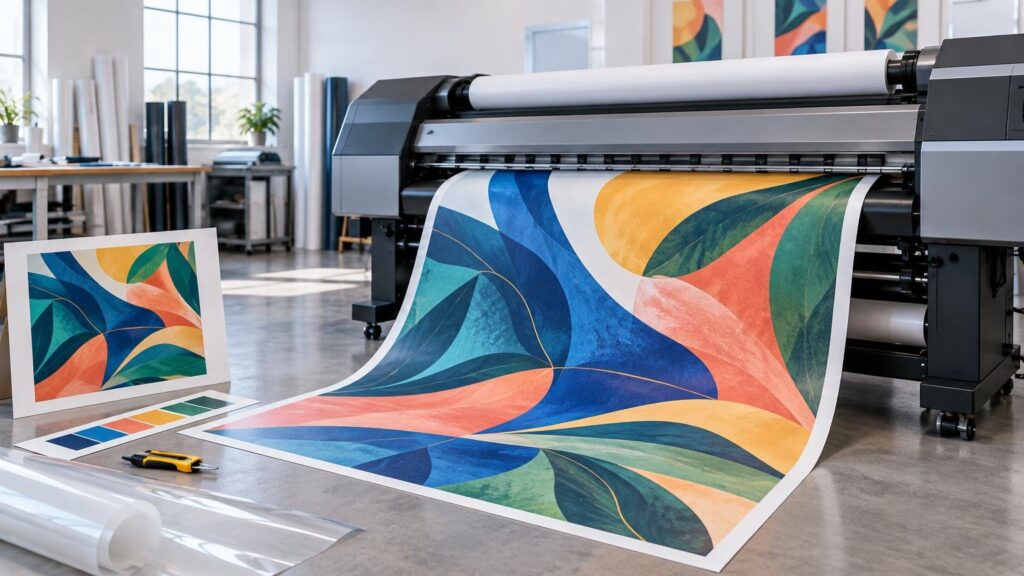
TLDR: What is wide format printing? It is digital print production designed for graphics and media beyond ordinary sheet-fed work. Typical applications include signs, banners, displays, decals, wall graphics, window graphics, and printed rigid boards. The important distinction is not one universal width cutoff. It is the production system: artwork and RIP settings, printer configuration, ink, substrate, drying or curing, finishing, and sometimes installation must all work together.
The practical answer to “what is wide format printing?” is therefore more useful than “printing something big.” A visually strong file can still fail if the ink does not adhere to the selected material, a board cannot move through the chosen printer, or the finishing specification ignores how the graphic will be handled. Printing United Alliance treats wide-format production as a system involving the digital front end, printer, substrate, and ink rather than an isolated output device.
What wide format printing is used for
Wide-format equipment is used when the size, material, finishing, or installation requirements move a project outside a conventional cut-sheet workflow. Common categories include banners, posters, point-of-purchase displays, event graphics, floor and window graphics, wall coverings, decals, backlit displays, and graphics printed or mounted on rigid panels.
Those categories describe applications, not guaranteed material compatibility. A machine that prints vinyl rolls may not accept a thick rigid board. A flatbed may accommodate a board physically but still require a compatible surface, ink system, adhesion strategy, and curing process. Even familiar products can use different workflows: a buyer ordering custom stickers may need roll printing and contour cutting, while a large rigid display could be printed directly on a board or printed on flexible media and mounted afterward.
How a wide-format job moves through production
A wide-format job generally passes through five connected stages. Each stage creates controls that can change appearance, cost, timing, and installation risk.
- Define the application. Establish final dimensions, viewing distance, installation surface, expected handling, exposure, and intended service period.
- Prepare and preflight the artwork. Check scale, effective image resolution, bleed, color setup, fonts, transparency, cut paths, panel divisions, and any required white-ink layers.
- Process the job through the RIP. The raster image processor interprets the file and applies settings such as media configuration, color management, print mode, ink limits, pass strategy, nesting, and cutting data.
- Print and dry or cure the output. The exact mechanism depends on the ink technology. Production must keep media transport, ink laydown, adhesion, temperature, and curing or drying conditions within the selected system’s requirements.
- Finish and prepare the graphic. Work may be trimmed, contour cut, laminated, mounted, routed, sewn, hemmed, fitted with grommets, packed, or divided into installation panels. Not every provider or machine offers every operation.
The RIP is a particularly important control point. It does more than enlarge a PDF. It converts design information into instructions the printer can execute and connects the artwork to a particular printer, ink set, and media configuration. That is why changing the substrate without updating the production settings can alter color, drying, adhesion, banding risk, and total ink load.
Roll-to-roll, flatbed, and hybrid printer paths
Wide-format inkjet equipment is commonly organized around how it transports media. Roll-to-roll, flatbed, and hybrid systems solve different production problems.
| Printer path | Typical media form | Production advantage | Main constraint to verify |
|---|---|---|---|
| Roll-to-roll | Flexible material supplied on a roll | Efficient transport for banners, films, papers, vinyl, and similar flexible media | Roll width, coating, heat sensitivity, take-up, ink compatibility, and later finishing |
| Flatbed | Sheets or rigid objects placed on a bed | Can print directly on compatible boards and other rigid substrates | Maximum sheet dimensions, thickness, flatness, weight, surface preparation, and ink adhesion |
| Hybrid | Configured to handle roll media and rigid sheets | Broader media flexibility within one equipment platform | Changeover method, transport configuration, supported thickness, and whether performance is equivalent in both modes |
Direct-to-board printing can remove a separate mounting step, but that does not automatically make it the better workflow. Printing flexible media and mounting it may make sense when the desired surface, replacement method, finish, or available equipment favors that route. Direct printing may make sense when reducing mounting labor and material layers is more important. The correct comparison includes the finished construction, not just the press pass.
The key control point: matching ink, media, and settings
A wide-format printer is part of a matched imaging system. The same artwork can behave differently as the substrate surface, ink chemistry, media profile, ink limit, print mode, and curing conditions change. Ink coverage, color gamut, and drying behavior have to be balanced for the selected medium.
For example, increasing ink is not a universal cure for weak-looking color. Too much ink for a particular medium and print mode can create drying, curing, coalescence, or surface-quality problems. Too little can reduce density or gamut. A suitable profile and tested media configuration seek a workable balance rather than simply maximizing ink.
This is also why a color value in the file is not a promise of an identical physical result on every material. A bright white, smooth film and a warmer, textured board interact with color differently. Profiles help map the source color into the available printer-and-media gamut, but substrate appearance remains part of the finished graphic. For a deeper explanation of that distinction, see how LAB color, profiles, gamut, and substrates interact in printing.
Wide-format ink systems and what they change
Wide-format printing can use aqueous, solvent or eco-solvent, UV-curable, latex or resin-type, and dye-sublimation approaches. FESPA’s overview of choosing ink for wide-format printing emphasizes matching the ink to the material and application. No ink family is automatically right for every job.
| Ink approach | Common production context | Questions that affect the decision |
|---|---|---|
| Aqueous | Compatible papers and coated media, including graphics where the printer and coating are designed to work together | Does the medium require a receptive coating, and what protection does the final application need? |
| Solvent or eco-solvent | Compatible flexible films, vinyls, and other media used in sign and display work | What ventilation, drying, outgassing, lamination timing, adhesion, and media requirements apply to the specific system? |
| UV-curable | Roll, hybrid, or flatbed production on compatible flexible and rigid media | How do ink adhesion, cure, flexibility, surface texture, and any required white ink affect the application? |
| Latex or resin-type | Compatible roll media and, depending on the equipment, other supported configurations | What temperature limits, media certification, scratch resistance, and finishing conditions apply? |
| Dye sublimation | Polyester-based textiles or coated rigid products through direct or transfer workflows | Does the material have the required polyester content or coating, and what heat-transfer process is needed? |
These are categories, not performance guarantees. Outdoor suitability, wash resistance, flexibility, scratch resistance, and lifespan depend on the exact ink, printer, material, profile, finish, exposure, maintenance, and test conditions. Manufacturer documentation can establish specifications for a defined system, but those specifications should not be generalized to unrelated equipment or media.
Finishing is part of the wide-format specification
Printing creates the image; finishing turns that image into an installable product. A banner may need trimming, hems, sewing, or grommets. A decal may need contour cutting and removal of excess matrix material. A display graphic may need mounting to a board, while a directly printed board may need routing to its final shape.
Lamination is similarly application-dependent. It can change surface appearance, handling, cleanability, rigidity, and resistance to certain forms of abrasion or exposure, but the appropriate construction depends on the complete ink-and-media system. HP’s application-specific durability guidance illustrates why protection decisions must be tied to a defined print system and use case rather than a blanket rule. A broader comparison of finish types is available in this guide to UV coating versus lamination.
Cutting also introduces tolerances. A contour line, printed border, or critical text placed too close to an edge can make normal variation more visible. Bleed and safe-area requirements should come from the producer’s actual workflow. The same principle applies whether the shape is made with a physical die or a digital cutting table; this guide to die cutting and digital cutting explains how artwork, tolerances, and quantity affect the choice.
Wide format printing vs. standard digital printing
The difference is not merely physical size. Standard cut-sheet digital work is usually imposed onto predefined sheets and finished with familiar operations such as guillotine cutting, folding, scoring, or booklet making. Wide-format work often introduces rolls, rigid boards, oversized flat pieces, tiled panels, contour paths, mounting, and installation hardware.
| Decision area | Standard sheet-fed digital work | Wide-format work |
|---|---|---|
| Media handling | Precut sheets within a press’s supported range | Roll media, oversized sheets, rigid boards, or system-specific specialty media |
| Viewing conditions | Often read or inspected at close range | May be viewed from arm’s length, across a room, from a road, or in changing light |
| File planning | Page size, bleed, imposition, folds, and trim | Scale, paneling, effective resolution, cut paths, installation overlap, and large-area color |
| Finishing | Cutting, folding, scoring, binding, coating, or lamination | Trimming, contour cutting, routing, mounting, sewing, hems, grommets, lamination, and installation preparation |
| Primary risk | Page-level color, registration, folds, binding, and trim | Media compatibility, adhesion, transport, drying or curing, panel matching, finishing, and installation fit |
Viewing distance deserves special attention. A graphic viewed from several metres away does not necessarily need the same effective image resolution as a photograph examined at close range. There is no responsible universal resolution number for every wide-format file. Final size, viewing distance, subject matter, RIP behavior, source-image quality, and printer capability all matter. Ask the producer for an effective-resolution target at final output size rather than enlarging a low-resolution image and relying on interpolation.
A practical wide-format project checklist
Before requesting a quote or approving a proof, specify the job as a finished application rather than just a width and height.
- Final dimensions and quantity, including whether the design will be tiled across panels
- Expected viewing distance and whether small text must be readable at close range
- Indoor or outdoor placement, without assuming that “outdoor” alone defines the required construction
- Flexible, self-adhesive, textile, or rigid material preference
- Installation surface, including texture, curvature, paint condition, and whether clean removal matters
- Expected handling, cleaning, abrasion, sunlight, moisture, temperature, and other relevant exposure
- Intended display duration, stated as a project requirement rather than a promised lifespan
- Required finish: matte, gloss, textured, laminated, unlaminated, or another supported option
- Required fabrication, such as contour cutting, routing, mounting, hems, sewing, pole pockets, or grommets
- Artwork scale, bleed, safe area, cut paths, panel overlap, and any white-ink requirements
- Packaging, shipping, installation sequence, and identification of multi-panel pieces
- A physical or appropriately produced proof when color, texture, opacity, adhesion, or construction is critical
Common questions about wide format printing
Is wide format the same as large format printing?
The terms are often used interchangeably. Some manufacturers and providers use wide format, large format, grand format, or superwide to distinguish equipment classes, but there is no single cutoff that governs all industry usage. Equipment specifications and supported media are more useful than the label alone.
Can wide-format printers print on foam board, acrylic, wood, glass, or metal?
Some flatbed and hybrid systems can print on certain rigid materials, but physical clearance is only one requirement. Surface energy, coatings, cleanliness, primer needs, ink adhesion, cure, flatness, weight, and finishing must also be evaluated. Compatibility should be confirmed for the specific machine, ink, and substrate.
Does every wide-format print need lamination?
No. Lamination should answer a defined need involving appearance, handling, abrasion, cleaning, exposure, or installation. Some applications benefit from it; others may use an unlaminated construction supported by the ink and media manufacturer. Verify compatibility because an unsuitable laminate or application process can create its own problems.
Is wide format printing suitable for outdoor signs?
It can be, provided the entire construction is specified for the conditions. Ink, substrate, adhesive, laminate, hardware, installation, orientation, climate, and exposure all affect performance. “Outdoor ink” by itself is not a complete outdoor-sign specification.
The ordering takeaway
Treat wide format printing as a production system, not a size category. Begin with where the graphic will go, how it will be viewed, what it must attach to, how it will be handled, and what finishing it needs. Then select a compatible printer path, ink, substrate, profile, curing or drying method, and fabrication plan. That sequence reduces the risk of buying a visually impressive print that cannot be installed or does not suit its intended environment.